


How We Built a Custom AI Chatbot for WordPress That Converts Job Seekers on Autopilot
Most job portals share the same silent conversion problem: visitors arrive, scroll through listings, find nothing that immediately fits, and leave. No application. No subscription. No return visit.
JobsVS — a German staffing agency based in Villingen-Schwenningen — faced exactly this challenge. Hundreds of open positions listed, but the gap between visitor arrival and job application was too wide. Search filters help only when the visitor already knows what they are looking for. Many job seekers do not. They know their skills and background. What they need is a guide.
The solution built for this project is a fully custom AI chatbot for WordPress — developed as a standalone native plugin — that acts as a personal job advisor for every site visitor. This is the technical story of how it works, what decisions drove the architecture, and what the results showed.
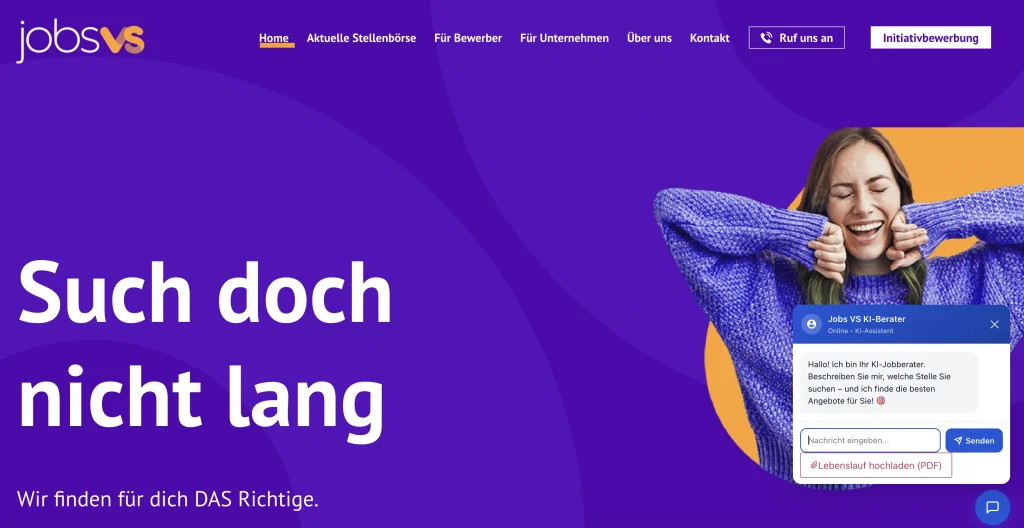
Plugin name: jobsvs-ai-chatbot — a native WordPress plugin with a REST API backend, vanilla JS frontend, five AI provider adapters, CV parsing, anti-hallucination post-processing, and an email notification engine. No third-party widget. No monthly SaaS fee.
What the AI Chatbot for WordPress Had to Do
Generic chatbots answer FAQs. This project needed something more specific. The requirements from day one:
- Understand the visitor’s background — not just their typed query, but their profession, experience level, and target role
- Surface relevant jobs from the live database — real-time queries against the existing WordPress job listings, not static recommendations
- Convert visitors — guide them toward a job application or an email subscription for future matches
- Work multilingually — the audience speaks German, English, Albanian, Turkish, Macedonian, and more
- Require zero ongoing cost — a small agency cannot absorb per-seat SaaS pricing for a chat widget
That last requirement forced a specific architectural choice: build a provider-agnostic plugin that can run on free AI API tiers, with automatic fallback when any single provider hits its limit.
Plugin Architecture: A Native WordPress Chatbot, Not an Embedded Widget
Rather than embedding a third-party chat widget with its own data pipeline, the decision was to build the WordPress chatbot plugin natively. The backend runs entirely through the WordPress REST API (/wp-json/jobsvs-chatbot/v1/). The frontend is vanilla JavaScript — no React, no Vue, no framework overhead — that loads asynchronously without affecting page speed scores.
This matters for a job portal: the existing job listings are stored as a custom post type (persy_job) powered by an existing scraper. A native plugin can query that post type directly on every chat message. A third-party widget cannot.
The same native pattern — WordPress REST API, vanilla JavaScript, swappable provider adapters — is the one we build on in WP Support Agent, our own WordPress AI chatbot plugin. If you are weighing a native plugin against a hosted widget, we compared the main WordPress chatbot plugins on grounding and real pricing.
Plugin Structure
jobsvs-ai-chatbot/n├── includes/n│ ├── class-rest-api.php # All chat endpointsn│ ├── class-cv-analyzer.php # AI-powered CV parsingn│ ├── class-job-searcher.php # Full-text + metadata searchn│ ├── class-knowledge-base.php # Company info from WP pagesn│ ├── class-notifications.php # Email subscriptionsn│ ├── class-conversation-history.phpn│ └── providers/n│ ├── abstract-ai-provider.phpn│ ├── class-provider-groq.phpn│ ├── class-provider-gemini.phpn│ ├── class-provider-openrouter.phpn│ ├── class-provider-zai.phpn│ └── class-provider-ollama.phpn├── admin/ # Settings, history, notificationsn└── assets/ # chatbot.js + chatbot.cssEach AI provider implements the same abstract interface. Adding a new provider in the future is a matter of extending one class — the rest of the plugin does not need to change.
Five AI Providers, One Automatic Fallback Chain
No single free AI provider is reliable at 100% uptime. Rate limits, model outages, and daily token caps are all real constraints on free tiers. The plugin supports five providers out of the box:
Provider Comparison
| Provider | Model | Notes |
|---|---|---|
| Groq | Llama 3.3 70B | Free tier, extremely fast — ideal as primary |
| Google Gemini | Gemini 2.0 Flash | Free API key, generous daily limits |
| OpenRouter | Multiple free models | Last-resort fallback; upstream rate limits aggressive |
| Z.ai / GLM | GLM-5.1, GLM-4.7 | Subscription plan; reasoning models need 2,048 max tokens |
| Ollama | Local model | Air-gapped or on-premise deployments |
When the primary provider fails — rate limit, network error, or model outage — the plugin automatically falls back to the next configured provider within the same request. The visitor never sees an error message. This fallback chain proved its worth during testing when Groq’s free tier hit its 100,000 token-per-day limit during a high-traffic period.
One lesson from the Z.ai / GLM integration: reasoning models deliberate internally before producing output. The max_tokens ceiling had to be raised from 1,024 to 2,048 to give those models enough room to complete their chain-of-thought and still return a full response.
CV Upload and Instant Job Profile Extraction
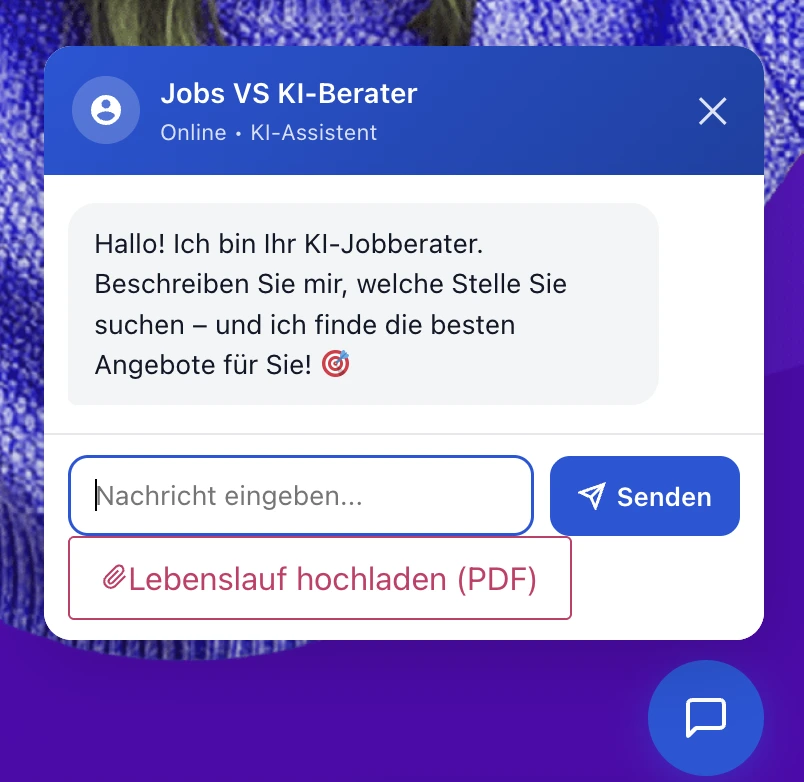
This is the feature that most separates the chatbot from a standard job search form. Visitors can upload their CV as a PDF directly in the chat window. The plugin processes it in three steps:
1. Text Extraction
The PDF is parsed using smalot/pdfparser (a Composer dependency). Raw text is extracted from the uploaded file server-side.
2. AI Profile Analysis
The extracted text is sent to the active AI provider with a structured HR-analyst prompt. The model returns a JSON object with 12 fields: name, profession, current_role, experience_years, seniority (Junior / Mid-level / Senior / Lead / Executive), skills (max 8), industries, preferred_location, preferred_salary, languages, career_summary, and also_suited_for.
3. Enriched Search
From this point on, every job search in the conversation is automatically enriched with the extracted profile. The visitor does not need to type their skills or experience level — the chatbot already knows. The also_suited_for field (2–3 alternative job titles the candidate may not have considered) directly expands the number of matching results.
CV summary is generated in German as a professional narrative — regardless of what language the CV was written in. The hiring context is German, so the summary is always presented to the visitor in the primary site language.
Gather Mode and the Anti-Hallucination Layer
Two separate problems required two separate solutions, but they work together in practice.
Gather Mode: Asking Before Searching
Running a database search on every message produces poor results when the visitor’s opening message is vague (“I need a job” or “help me find work”). The plugin introduces a gather mode: when no extractable search criteria are present in the conversation and no CV has been uploaded, the chatbot skips the database query entirely and instead asks one focused clarifying question:
“Schön, dass Sie da sind! In welchem Bereich oder welcher Tätigkeit suchen Sie eine Stelle?”
Only after the visitor provides a meaningful answer does the plugin extract keywords, run the job search, and present results. This two-step flow reduces irrelevant responses and makes the conversation feel natural rather than like a search form with a chat interface on top.
Anti-Hallucination: Two Layers of Protection
Large language models will sometimes “helpfully” generate job listings from training data when no real results are available. On a job portal, this is a serious trust problem — visitors clicking links that do not exist. Two layers of protection were implemented:
- System prompt prohibition: The system prompt opens with an absolute prohibition block: the AI is instructed that it may only mention job listings that appear verbatim in the provided job data block. It is explicitly forbidden from inventing titles, companies, locations, salaries, or URLs.
- Post-processing sanitizer: After every AI response, a PHP function scans the reply for internal domain URLs that were not present in the job list injected into the prompt. Any paragraph containing a fabricated URL is stripped silently. If the entire response is fabricated, a safe fallback message is returned instead.
During testing across multiple models, the sanitizer actively caught fabricated listings from three different providers. The instruction-following approach alone was not sufficient — the post-processing layer is non-negotiable for any production deployment of this kind.
Multilingual Support and Company Knowledge Base from WordPress Pages
Germany’s workforce includes a large proportion of workers whose first language is not German — a reality that is especially relevant for a staffing agency. The chatbot automatically detects the visitor’s language from their first message and responds in that language for the entire conversation. German is the default. In practice, conversations have taken place in English, Albanian, Macedonian, Turkish, and Italian — all from the same codebase, with no translation tables or language packs required. The AI handles the language switch natively.
Even job titles, salary descriptions, and call-to-action text within the chatbot’s responses are contextualised to the conversation language by the model.
Company Knowledge Base
A recurring visitor request was: “Where is your office?”, “What are your opening hours?”, “How do I contact you?” Rather than hardcoding these answers in the plugin config, the knowledge base layer reads directly from published WordPress pages — specifically the Impressum, Kontakt, Über uns, and Für Unternehmen pages. These pages are fetched, stripped of HTML, and injected into the system prompt on every request.
When a visitor asks a company question, the bot answers with live data from the actual website pages. The cache auto-refreshes whenever a page is updated in the WordPress admin — so the bot always reflects current content without any manual syncing.
Automated Email Job Notifications Inside the Chat Window
Visitors who do not find a matching job in the current session are offered an email subscription for future matching jobs. The subscription form is presented inside the chat window and is pre-filled with the visitor’s profession and location — extracted from their CV or gathered through conversation.
Subscribers can filter by job title, city plus radius, minimum salary, and employment type (full-time, part-time, mini-job, freelance — multi-select). When a new job is published on the site, a hook fires a matching engine that scores every subscriber against the new job across four dimensions: profession/keywords, city, salary, and employment type. Subscribers scoring 50 points or above receive an automated HTML notification email.
The email sender name and address are configurable from the admin panel. All outgoing emails are logged in a dedicated database table with status, recipient, job ID, and timestamp — so there is a complete audit trail of what was sent, to whom, and when.
What the Team Learned Building a Custom WordPress AI Chatbot from Scratch
Several constraints and edge cases surfaced during development that are worth noting for anyone planning a similar build:
- Free tier token caps are a real production constraint. Groq’s free tier runs at roughly 80–100 full job-search conversations per day before hitting the 100,000 token daily limit. Production deployments need a paid provider or a subscription plan as the primary, with free tiers as fallback.
- Reasoning models need more room. GLM-5.1 and GLM-4.7 deliberate internally before producing output. The
max_tokensceiling had to be raised to 2,048 for them to complete their chain-of-thought and still return a full response. Leaving it at 1,024 produced truncated answers. - OpenRouter free models are for fallback only. Upstream providers behind OpenRouter rate-limit aggressively. Usable as a last-resort option, not as a primary provider.
- The sanitizer catches real hallucinations. The post-processing URL sanitizer was not added as a precaution — it was added because testing showed active hallucination from multiple providers. Prompt-level instructions are not sufficient on their own.
- PDF parser coverage is imperfect. Some CVs — particularly scanned image-based PDFs — return minimal text. Handling this gracefully (asking the visitor to paste their experience directly into chat) is a necessary UX fallback.
Results After Deployment
The entire plugin runs on shared WordPress hosting with no external services beyond an API key from the chosen AI provider. Groq and Google Gemini both offer free tiers sufficient for small to medium traffic volumes — making this architecture viable for agencies and job portals that cannot justify a monthly SaaS spend.
Since deployment on the live site, several patterns have become clear:
- Visitors who interact with the AI chatbot for WordPress stay on site significantly longer than those who navigate only through static search filters
- CV upload sessions produce the highest-quality matches — the extracted profile leads to tighter, more relevant job results on the first search query, with no typing required from the visitor
- The email subscription conversion rate from inside the chat window outperforms the standalone subscription form elsewhere on the site
- Zero fabricated job links have been reported since the anti-hallucination sanitizer was deployed — the two-layer protection has held under real traffic
- The multilingual capability has handled conversations in five languages without any additional configuration — removing a barrier that would have affected a significant portion of the site’s audience
- Self Healing – The ChatBot will self improve the answers. Its keeping track of conversations and evaluating its own responses
Want a Custom AI Chatbot Built for Your WordPress Site?
TechCreative builds custom WordPress plugins and AI integrations for membership platforms, job portals, and content-heavy sites. If a generic widget will not cut it for your use case, the team can scope a native build. See WordPress development services →
Frequently Asked Questions
An AI chatbot for WordPress is a plugin or integration that adds a conversational AI assistant to a WordPress site. It can answer visitor questions, guide users through content, surface database results, and capture leads — all without a human operator. Build options range from embedding a third-party widget (faster but less customisable) to building a native WordPress plugin with full control over data, prompts, and integrations.
Yes. TechCreative builds custom WordPress plugins including AI chatbots. A native plugin approach gives full control over how the chatbot connects to your existing WordPress data — post types, user data, WooCommerce products, or job listings — rather than relying on a third-party widget that cannot access your CMS content directly.
For low-to-medium traffic on a budget, Groq (Llama 3.3 70B) is the fastest free-tier option. Google Gemini (Gemini 2.0 Flash) offers a generous free API and good multilingual capability. For production deployments with consistent traffic, a paid plan from one of these providers or a subscription plan such as Z.ai is more reliable than depending on free tier limits.
Two layers: a strict system prompt prohibition that instructs the model to only reference data explicitly provided in the prompt (in this case, a block of live job listings), and a post-processing sanitizer that scans every AI response for fabricated internal URLs and strips them before the visitor sees the message. Testing showed that prompt instructions alone are not sufficient — the sanitizer layer is essential for production use.
Yes, when built on a capable model like Llama 3.3 70B or Gemini 2.0 Flash. The chatbot detects the visitor’s language from their first message and responds in that language for the entire session. No translation tables or language pack configuration is required — the AI handles the switch natively. German, English, Albanian, Turkish, Macedonian, and Italian have all been observed in production.
The plugin accepts a PDF upload directly in the chat window. Server-side, the PDF text is extracted using a PHP library, then sent to the AI provider with a structured parsing prompt. The model returns a profile object containing the visitor’s profession, experience level, skills, preferred location, and salary expectation. All subsequent job searches in the session are automatically enriched with this profile, so the visitor does not need to type any of it.
Yes. The plugin includes an email subscription engine that allows visitors to sign up for job alerts from within the chat window. When a new job is published, a matching engine scores every subscriber against the new listing across four dimensions and sends an automated notification to those above the threshold. All outgoing emails are logged in a custom database table.
Cost depends on the complexity of the integration — how much existing WordPress data the chatbot needs to access, how many AI provider adapters are required, and whether features like CV parsing and email notifications are in scope. TechCreative scopes these projects on a per-requirement basis. A discovery call is the first step. See the WordPress development services page for context on how custom plugin projects are approached.


