


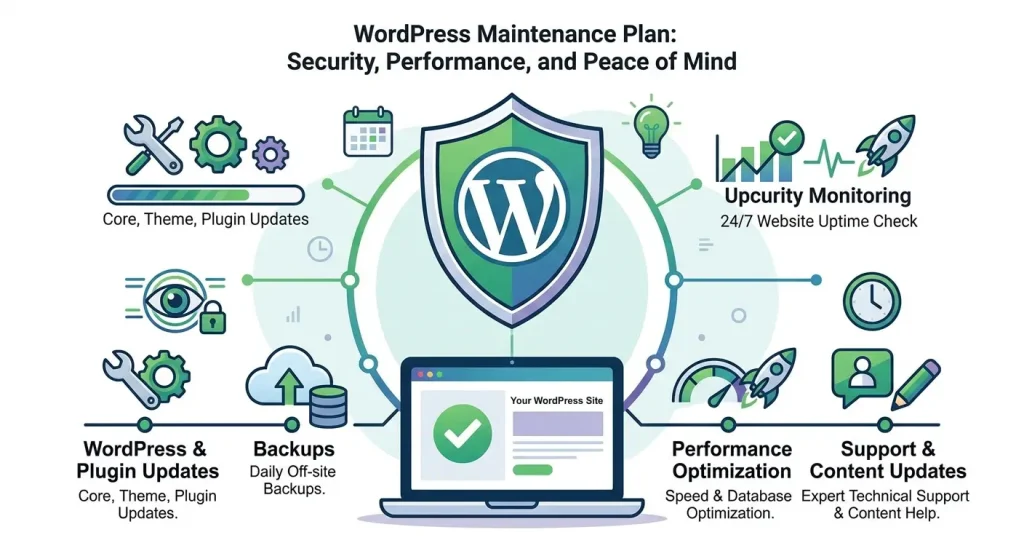
A WordPress website maintenance plan is a monthly service where a developer or agency keeps your site updated, tested, backed up, monitored and secure on a fixed schedule, and sends you a record of what changed. In 2026 most small business plans run between $50 and $350 per month, and the work behind that number varies enormously from one provider to the next.
This page covers what a maintenance plan actually includes, what the market charges and why, the schedule a competent provider works to, how a plan differs from managed hosting, and how to decide whether you need one at all. If you run a membership site, an LMS or a WooCommerce store, there is a section below on why those sites need a different level of care than a brochure site.
What Is a WordPress Website Maintenance Plan?
A WordPress website maintenance plan is a recurring service contract. You pay a monthly fee; a provider takes ongoing responsibility for the technical health of your site. That means applying WordPress core, plugin and theme updates on a defined cadence, testing those updates somewhere safe before they touch your live site, keeping backups off the server, watching for malware and known vulnerabilities, and being reachable when something breaks.
The reason this is a service and not a checkbox is that WordPress is not one piece of software. A typical business site runs core plus 20 to 40 plugins plus a theme, each on its own release cycle, each maintained by a different team. Updates are constant, and they occasionally conflict. Patchstack’s annual WordPress security reports consistently attribute over 90% of newly disclosed WordPress vulnerabilities to plugins rather than to core. Core largely takes care of itself. Everything bolted onto it is the actual job.
Maintenance Plan, Care Plan, Support Plan: Is There a Difference?
No. “WordPress care plan”, “WordPress maintenance plan”, “WordPress support plan” and “website maintenance package” describe the same service. Agencies picked different names for marketing reasons, not because the deliverables differ. We use “care plan” for our own products and “maintenance plan” when explaining the category, and they mean the same thing here.
What does differ, meaningfully, is scope. Two plans at the same price can be wildly different: one is an automated update bot with a dashboard, the other is a developer who tests on staging and picks up the phone. The section on what to look for below covers how to tell them apart before you pay.
What Is Included in a WordPress Website Maintenance Plan?
Nine things make up a serious WordPress website maintenance plan. Providers vary on how many they cover and how deeply, but this is the full list to measure any quote against.
1. WordPress Core, Plugin and Theme Updates
The base deliverable. Core, every active plugin, and the theme get updated on a schedule: monthly, bi-weekly or weekly depending on your tier. Cadence matters more than people expect. A vulnerability disclosed the day after a monthly update window sits exposed for four weeks. That is why revenue-generating sites usually belong on weekly, and why any decent provider will break the schedule to push a critical security patch within 24 to 48 hours rather than wait for the next window.
Automatic updates are not the same thing. WordPress can auto-update plugins for free. What it cannot do is notice that the update changed your checkout page, and roll it back.
2. Staging Environment and Regression Testing
Updates should go to a staging copy of your site first, get tested against the pages that matter, then deploy to production once they pass. This is the single line item that separates a real maintenance plan from an automated updater, and it is the one most often quietly missing from cheap plans.
Regression testing means checking that the things that worked yesterday still work today: checkout completes, the login redirect lands in the right place, the course player loads, the contact form sends. Automated source-code comparison catches unexpected markup changes; a human still clicks through the critical paths.
3. Offsite Backups You Have Actually Restored
Backups stored on the same server they are backing up are worthless the moment that server fails. Backups need to live somewhere else, run on a schedule that matches how often your content changes, and retain enough history that you can go back past the day the problem started, which is rarely the day you noticed it.
The question to ask a provider is not “do you take backups” but “when did you last restore one”. An untested backup is a hypothesis. Backups are typically handled at the hosting layer; ours are included on our managed membership and LMS hosting, and on third-party hosting we verify that yours are running and restorable rather than assuming.
4. Security Scanning, Vulnerability Monitoring and Malware Removal
Two different jobs get bundled under “security”. Scanning looks at your site for infections already present: injected scripts, backdoors in the uploads directory, modified core files, spam pages generated for someone else’s SEO. Vulnerability monitoring works the other way, checking your installed plugin versions against published vulnerability disclosures so you find out that a plugin you run has a known exploit before an automated scanner finds it for you.
Both should run continuously, not on the day of your update window. If something is found, cleanup should be part of the plan, not a surprise invoice.
5. Uptime and SSL Certificate Monitoring
Uptime monitoring checks your site every few minutes and alerts your provider when it stops responding, so the first person who knows your site is down is not a customer. SSL monitoring is the unglamorous one nobody thinks about until a certificate silently fails to renew and every visitor gets a full-screen browser warning for two days. Certificate expiry alerts cost nothing to set up and prevent one of the more embarrassing outages available to a business website.
6. Performance and Core Web Vitals Checks
Sites get slower over time. Plugins accumulate, image libraries grow, a page builder adds another stylesheet, someone installs a slider. A maintenance plan should track performance scores month over month rather than testing once at launch and never again, so you can see the trend and catch the specific change that caused a drop.
Monitoring is not the same as fixing. Recurring checks against Google PageSpeed Insights belong in a maintenance plan; rebuilding your caching and asset delivery is a project. If a site needs the second, we quote it as WordPress speed optimization work rather than pretending a monthly retainer covers it.
7. Transactional Email Deliverability
This is the most commonly missing item on the market, and on membership and e-commerce sites it is one of the most expensive to get wrong. Password resets, purchase receipts, course enrolment notices and renewal reminders all leave your site as transactional email. When SMTP credentials expire or a sending domain’s authentication records drift, those emails stop arriving, silently. Nobody reports it because the people affected cannot log in to tell you.
A plan should log outgoing mail and flag failures. Checking that password resets actually land takes a minute a month and saves support tickets that would otherwise arrive as refund requests.
8. Database Cleanup, Broken Links and Form Testing
The housekeeping tier: clearing expired transients and orphaned metadata, trimming post revisions, deleting spam comments, finding internal links that now 404 after a page was renamed, and submitting a test entry through every form on the site. None of it is dramatic. All of it is the sort of thing that quietly degrades a site over a couple of years, and it is cheap to do while someone is in there anyway.
9. Monthly Reporting and a Named Human
You should receive a monthly report listing what was updated, what was found, what was fixed and what needs a decision from you. If you cannot tell from your provider’s reporting what you paid for last month, you are buying a subscription rather than a service.
Support matters just as much. On a maintenance plan you are an existing client with a known site, which means someone already understands your setup when you email at 9pm about a broken checkout. That context is most of the value.
What a WordPress Website Maintenance Plan Does Not Include
Worth stating plainly, because unclear scope is where these relationships go wrong. A maintenance plan is upkeep, not development. It does not normally cover:
- New features or design changes — building a new landing page, adding a booking system, restyling your theme. That is project work, quoted separately or drawn from included developer hours.
- Content writing and publishing — some agencies bundle a few content hours; most do not.
- SEO campaigns — technical hygiene like fixing broken links overlaps with SEO, but keyword strategy, content production and link building are a separate service.
- Hosting — most maintenance plans exclude it. Budget $25 to $100 a month on top unless your provider bundles both.
- Plugin and theme licence fees — your MemberPress, LearnDash or Elementor Pro renewals stay yours. A provider who lets those lapse is storing up an update failure for later.
The WordPress Maintenance Schedule: What Happens and How Often
A WordPress website maintenance plan is a schedule, not a single monthly action. This is the cadence we work to, and a reasonable benchmark for evaluating anyone else’s plan.
| Frequency | Tasks |
|---|---|
| Continuous | Uptime monitoring, SSL expiry alerts, malware scanning, vulnerability disclosure matching against installed plugins |
| Within 24–48 hours | Critical security patches, applied outside the normal window |
| Weekly to monthly (by tier) | Core, plugin and theme updates on staging, regression testing, deployment to live, cache purge |
| Monthly | Full malware scan, backup verification, performance score check, transactional email check, form submission tests, client report |
| Quarterly | Database cleanup, broken link sweep, plugin audit (remove what is no longer used), backup restore test |
| Annually | PHP version review and upgrade, licence renewal audit, security hardening review, full performance review |
The quarterly plugin audit is the one people skip and shouldn’t. Every plugin you no longer use is attack surface you are still paying to maintain. The fastest performance win on most sites we inherit is deleting things.
How Much Does a WordPress Website Maintenance Plan Cost in 2026?
Most small and medium business sites pay between $50 and $350 per month. Below that, you are usually buying automated updates with no testing. Above it, you are into e-commerce and enterprise plans with included development hours and response-time guarantees.
| Plan Tier | Typical Market Price | Update Frequency | Usually Includes |
|---|---|---|---|
| Basic | $50–$99/mo | Monthly | Updates, backups, security scan, email support |
| Standard | $100–$199/mo | Bi-weekly | The above plus staging tests, uptime monitoring, monthly reporting |
| Premium | $200–$350/mo | Weekly | The above plus included developer time, priority response, performance monitoring |
| E-commerce / enterprise | $350–$1,000+/mo | Weekly or continuous | The above plus SLA-backed response, transaction monitoring, staged release process |
What Actually Drives the Price
Four variables explain almost every quote you will receive:
- Update frequency. Weekly costs roughly three times monthly, because it is roughly three times the work.
- Whether staging and testing are included. The cheapest plans skip this. It is most of the labour and all of the safety.
- Site complexity. A ten-page brochure site and a membership site with 40 plugins, a payment gateway and gated content are not the same job.
- Included developer time and response speed. An included hour a month plus priority support is real cost, and it is usually the difference between a $139 plan and a $249 one.
The DIY Comparison
Doing it yourself is not free, it is just unbilled. A comparable toolset — a premium security plugin, a backup service with offsite storage, an uptime monitor, a staging environment — typically lands somewhere between $30 and $80 a month once you add up the annual licences. Then add your time: two to four hours a month for a modest site, more when an update breaks something and you spend an evening bisecting plugins to find out which one.
Set that against the downside. A malware cleanup typically runs $300 to $1,000 as a one-off. A checkout that has been quietly broken since Tuesday costs whatever you would have sold between Tuesday and whenever somebody noticed.
WordPress Maintenance Plan vs. Managed WordPress Hosting
A WordPress website maintenance plan and managed hosting get confused constantly, and hosting companies do not go out of their way to clear it up. They cover different layers.
| Managed Hosting | Maintenance Plan | |
|---|---|---|
| Server uptime and resources | Yes | No |
| Server-level security and firewall | Yes | No |
| Server-level backups | Usually | Verifies and supplements |
| Core updates | Often automatic | Yes, tested first |
| Plugin and theme updates | Rarely, and untested if so | Yes, on staging |
| Someone checks the site still works after updating | No | Yes |
| Fixes it when a plugin conflict breaks your checkout | No, that is your application | Yes |
Good hosting keeps the floor from collapsing. A maintenance plan keeps the building in order. Most production sites need both, and the common failure mode is assuming your host is handling the plugin layer when their support scope explicitly excludes it. If you would rather have both from one provider, our managed hosting for membership and LMS sites pairs with the care plans below.
Do You Actually Need a WordPress Website Maintenance Plan?
A straight answer, by situation.
Yes, almost certainly, if: your site takes payments, gates content behind logins, holds customer data, generates leads you rely on, or would cost you real money to have offline for a day. Membership sites, LMS platforms and WooCommerce stores are all in this category by definition. So is any site where you are the only person who could fix it and you do not want that job.
Probably, if: you have a brochure site with a dozen plugins and no in-house technical person. A monthly plan at the lower tier is enough. You are buying the guarantee that someone is looking, not intensive work.
Probably not, if: you are a developer maintaining your own site, or you run a genuinely simple site — a handful of pages, five or six plugins, no transactions, no logins — and you are comfortable running updates yourself after taking a backup. In that case, good hosting with automatic core updates and a backup service will cover you, and you should spend the money elsewhere. We would rather tell you that now than sell you a plan you resent in month four.
The awkward middle case is the site that used to be simple. Sites accumulate. If you have not counted your plugins recently, count them, and if the number surprises you, that is your answer.
Maintenance for Membership, LMS and WooCommerce Sites
If your site runs MemberPress, Paid Memberships Pro, Restrict Content Pro, LearnDash, LifterLMS, BuddyBoss or WooCommerce Subscriptions, maintenance stops being hygiene and becomes revenue protection. These plugins sit on the critical path for access control and billing, they release frequently, and they have deep interdependencies with each other and with your theme.
The failure modes are specific, and generic maintenance providers do not look for them:
- A caching layer starts serving a logged-in member’s page to a logged-out visitor, or breaks the login redirect entirely.
- A BuddyBoss update changes a template that LearnDash overrides, and the course player loses its progress bar.
- A gateway webhook stops being received after an update, so renewals process at Stripe but never mark the subscription active in WordPress. Members get locked out of content they have paid for.
- Drip schedules or access rules silently stop applying after a plugin changes how it stores rules.
- Transactional email fails, so nobody receives a receipt, a welcome sequence or a password reset.
Every one of those is invisible from a dashboard that only reports “12 plugins updated”. They are found by clicking through a real member journey after an update, on staging, by someone who knows what the journey is supposed to look like. That is the work.
This stack is what we do. We have run sites carrying over 80 active plugins without conflicts, and handled a zero-downtime migration from Restrict Content Pro to MemberPress for 90,000+ users. If you are still building, our done for you membership site service covers the build, and the care plan picks up afterwards.
How Our WordPress Website Maintenance Plans Work
Specifics, so you can compare like for like rather than reading adjectives.
Your site connects to our own dashboard, not a third-party SaaS. We run a self-hosted MainWP control panel on our infrastructure. Your site gets one lightweight connector plugin. No external company holds standing credentials to your WordPress install, and there is no per-site SaaS fee buried in your invoice.
Monitoring runs continuously between windows. Uptime checks, SSL certificate expiry alerts, malware scanning through Sucuri and Wordfence, and a vulnerability checker that matches your installed plugin versions against published disclosures. If something with a known exploit is sitting on your site, we find out from the feed rather than from your traffic.
Every update goes to staging first. We clone your site, apply updates there, and run an automated source-code comparison that flags any unexpected change in the rendered output. Then a person walks the paths that matter on your site: checkout, login, course access, forms. Only after that does anything reach production, and caches get purged on deploy so nobody sees a half-updated page.
Performance and email get checked, not assumed. We track Lighthouse and PageSpeed Insights scores month over month so a slowdown shows up as a trend rather than a complaint, and we monitor outgoing transactional email so a silent SMTP failure gets caught in days rather than quarters.
You get a report and a person. A monthly report shows exactly what was updated, what was scanned, what was found and what we recommend next. Support goes to a developer who already knows your setup, not a ticket queue that asks you to describe your site from scratch.
What to Look for in a Provider (and Five Red Flags)
Ask these five questions before signing up to any WordPress website maintenance plan:
- Do updates go to staging first? If the answer is anything other than a clear yes, you are buying automated updates with a logo on them.
- Where do backups live, and when did you last restore one? Offsite, and recently. Both parts matter.
- What does the monthly report contain? Ask to see a real one with the client details removed.
- What is your response time for a site that is down, in writing? “We’ll get to it” is not an SLA.
- Have you worked on this specific stack? Ask a MemberPress or LearnDash question and see whether the answer is specific.
Red flags: no staging, backups stored on the same server, no reporting at all, long lock-in contracts on a monthly service, and “unlimited edits” offers, which are either heavily fine-printed or unsustainable, and in both cases end the same way.
TechCreative WordPress Care Plans and Pricing
Our WordPress website maintenance plans come in three tiers, month to month, with no lock-in. All of them include staging deployment, full regression testing, security hardening, malware scanning and email support — the difference is cadence and how much developer time comes with it.
| Plan | Price | Updates | Developer Time |
|---|---|---|---|
| Basic Care Plan | $79/mo | Monthly | 5% discount on developer hours |
| Enhanced Care Plan | $139/mo | Bi-weekly | 10% discount on developer hours |
| Pro Care Plan | $249/mo | Weekly | 1 included hour per month, 15% discount, priority support |
For a membership site, LMS or store taking payments, we recommend the Pro plan. Weekly windows keep your exposure to a disclosed vulnerability down to days rather than a month, and the included developer hour covers the small fixes that otherwise sit on a list until they become urgent.
Frequently Asked Questions
What is a WordPress website maintenance plan?
A WordPress website maintenance plan is a recurring monthly service where an agency handles WordPress core, plugin and theme updates, tests them on staging, monitors security and uptime, keeps offsite backups, and provides technical support. It is the same service that agencies also market as a WordPress care plan or support plan.
How much does a WordPress website maintenance plan cost?
Most plans cost between $50 and $350 per month in 2026, depending on update frequency, whether staging testing is included, site complexity and included developer time. E-commerce and enterprise plans run higher. TechCreative plans start at $79/month for monthly maintenance and go to $249/month for weekly updates with an included developer hour.
Is a WordPress maintenance plan the same as managed hosting?
No. Managed hosting covers the server: uptime, resources, server-level security and usually server backups. A maintenance plan covers the WordPress application on top of it: plugin and theme updates, testing, malware cleanup and support when something breaks. Most hosts explicitly exclude plugin conflicts from their support scope, so production sites generally need both.
Do I need a maintenance plan if my site does not change often?
Yes. Plugin vulnerabilities are disclosed on the plugin author’s schedule, not yours, and automated scanners target sites regardless of how active they are. A static site that has not been edited in six months still needs its plugins updated. You can run a lower cadence — monthly is fine — but no live site should go unmaintained.
How often should WordPress plugins be updated?
Critical security patches should be applied within 24 to 48 hours of release, outside the normal schedule. Everything else can be batched into a maintenance window: weekly for sites taking payments or gating content, bi-weekly for busy business sites, monthly as the minimum for anything live. Batching is safer than updating piecemeal because everything gets tested together.
Can I just use automatic updates instead?
You can, and for a simple site with few plugins it is better than nothing. The limitation is that automatic updates apply changes to your live site with nothing checking the result. Nothing notices that your checkout now throws an error, and nothing rolls it back. On any site where a broken page costs money, tested updates are the point of paying for a plan.
What is the difference between a basic and a premium WordPress care plan?
Basic plans cover monthly updates, backups and security scanning. Premium plans add bi-weekly or weekly update windows, faster response times and usually a block of included developer time. For revenue-generating sites the shorter window is the main value: it limits how long a known vulnerability can sit on your site before it is patched.
Can I cancel a WordPress maintenance plan?
With us, yes — plans are month to month with no long-term contract, and you can cancel any time. Some providers require annual commitments, so check the term before signing. On a service billed monthly, a long lock-in is usually protecting the provider rather than you.
Take Maintenance Off Your Plate
If your site earns money, gates content or holds customer data, a WordPress website maintenance plan is the cheapest insurance available to you. Ours start at $79/month, run month to month, and are built around membership and LMS stacks specifically.
Browse our WordPress care plans, or book a call and we will look at your site and tell you which tier it actually needs — including if that answer is none.


